

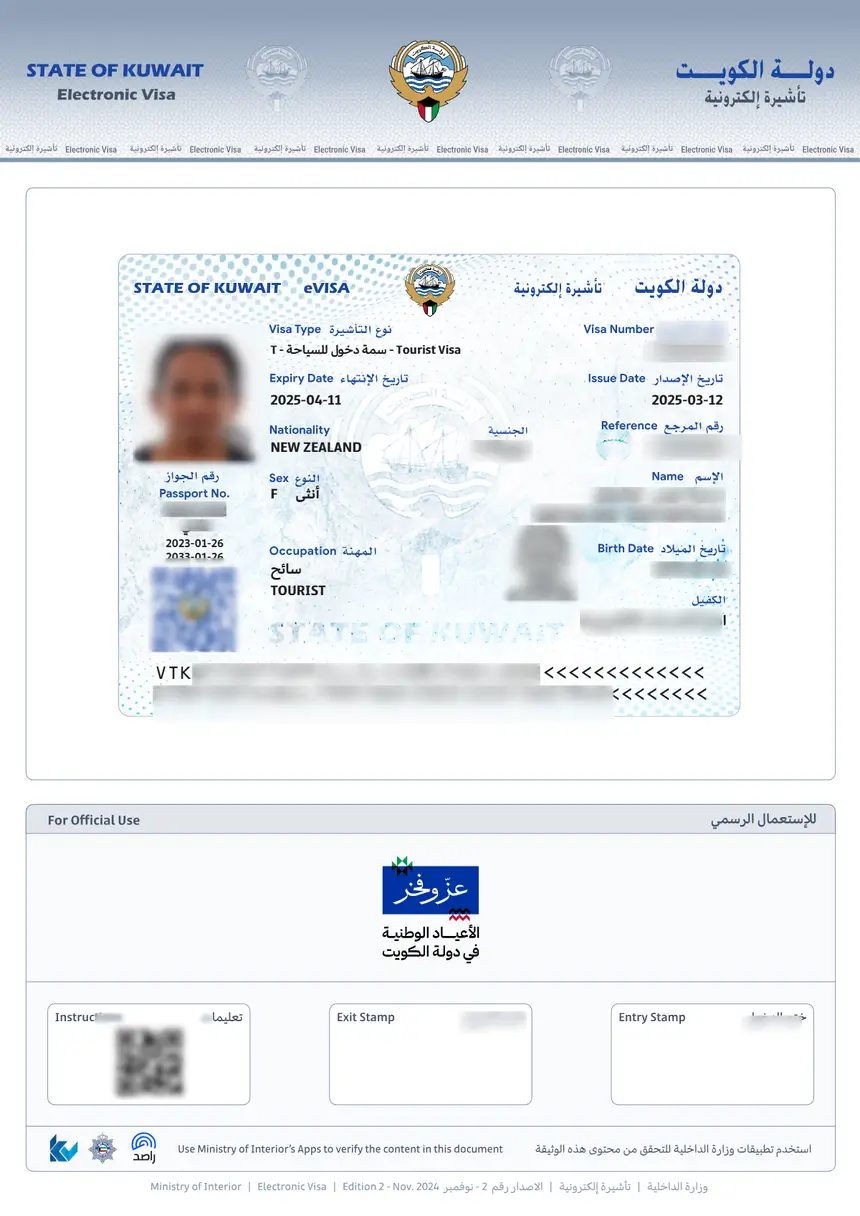
Once your Kuwait eVisa is approved, you must download the PDF from the official MOI portal at kuwaitvisa.moi.gov.kw, print it, and carry the hard copy when you travel. The eVisa document contains your visa number, personal details, and validity dates that immigration officers verify at the port of entry.
How to Download Your Kuwait eVisa PDF
After your application is approved (typically within 2 business days), you receive an email notification from the Ministry of Interior. The eVisa document is a downloadable PDF that you must save and print before your trip.
Follow these steps to download your Kuwait eVisa:
Step 1: Log In to the MOI Portal
Go to kuwaitvisa.moi.gov.kw and sign in with the email and password you used during your application. If you forgot your password, use the “Forgot Password” link to reset it via email.
Step 2: Navigate to Your Application
Once logged in, go to “My Applications” or “Application Status.” You will see a list of all your submitted visa applications. Find the approved one – it will show a green “Approved” status badge.
Step 3: Click the Download Button
Next to your approved application, click the “Download” or “Print Visa” button. The system generates a PDF file containing your official Kuwait eVisa. Save it to your device immediately.
Step 4: Verify the PDF Details
Open the downloaded PDF and confirm that all information matches your passport exactly:
| Field | What to Check |
|---|---|
| Full name | Must match passport spelling exactly |
| Passport number | Correct number, no typos |
| Nationality | Matches your citizenship |
| Visa number | Unique reference number for your eVisa |
| Issue date | Date the visa was issued |
| Expiry date | Visa validity deadline |
| Entry type | Single entry |
If any detail is incorrect, contact the MOI support through the portal before traveling. A mismatch between your eVisa and passport can result in denied boarding or entry refusal.
What the Kuwait eVisa PDF Contains
The downloaded PDF is an official government document issued by the Kuwait Ministry of Interior. It includes:
- Visa number – A unique reference used to verify the visa at immigration
- Applicant details – Full name, nationality, date of birth, passport number
- Visa type – Visit visa (electronic)
- Validity period – Entry must occur before the expiry date (90 days from issue)
- QR code – Scannable code for quick verification by immigration officers
- MOI verification link – URL to confirm the visa’s authenticity online
The PDF is digitally signed by the Ministry of Interior. Immigration officers at Kuwait International Airport and land border crossings scan the QR code to verify your visa in real time.
Printing Your Kuwait eVisa
You must carry a printed hard copy of your eVisa when traveling to Kuwait. Digital copies on your phone are not accepted at all checkpoints.
Printing guidelines:
- Paper size: Standard A4 or US Letter
- Print quality: Use a clear, high-resolution printout – the QR code must be scannable
- Color vs black-and-white: Color is preferred but black-and-white is acceptable as long as the QR code is legible
- Copies: Print at least 2 copies – one for your travel documents and one as a backup
Keep the printed eVisa with your passport throughout your journey. Airlines may check it during check-in or boarding, and Kuwait immigration officers will collect it at the port of entry.
How to Check If Your eVisa Is Still Valid
Before booking your trip, verify that your eVisa has not expired. The Kuwait eVisa is valid for 90 days from the date of issue. If it has expired, you must apply for a new one – there is no extension or renewal option for the eVisa itself.
You can check validity through:
- The downloaded PDF – Look at the “Expiry Date” field on your eVisa document
- The MOI portal – Log in and check the application status; expired visas show a different status badge
- Online verification – Use the Kuwait eVisa status check tool to confirm by passport number
If your eVisa has expired, you will need to submit a fresh application and pay the KWD 3 fee again. For details on processing timelines, see our guide on Kuwait eVisa processing time.
Can You Download the eVisa on Your Phone?
Yes, you can download and save the eVisa PDF on your smartphone. Both Android and iOS devices support PDF viewing and saving. However, you should still print a physical copy – some airline check-in counters and immigration booths require a hard copy.
Tips for mobile storage:
- Save the PDF to your phone’s Downloads folder and also to a cloud service (Google Drive, iCloud) as backup
- Take a screenshot of the PDF’s first page as an additional reference
- Make sure your phone is charged and accessible at the airport in case you need to show the digital copy
Common Problems When Downloading the Kuwait eVisa
Some applicants face issues when trying to download their eVisa. Here are the most common problems and how to fix them:
| Problem | Cause | Solution |
|---|---|---|
| Download button not visible | Application still under review | Wait 2-5 business days and check again |
| PDF not opening | Corrupted download or incompatible PDF reader | Re-download and use Adobe Acrobat Reader |
| Login fails | Wrong email or forgotten password | Use “Forgot Password” to reset |
| Application shows “Rejected” | Missing documents or eligibility issue | Check rejection reason and reapply with correct documents |
| No email notification | Email went to spam folder | Check spam/junk; add MOI sender to contacts |
| Visa details are wrong | Data entry error during application | Contact MOI support through the portal to request a correction |
If your application has been pending for more than 7 business days, contact the Ministry of Interior through the portal’s support section. Processing typically takes 2 business days, but delays can occur during peak travel seasons or holidays.
What to Do If You Lost Your eVisa PDF
If you accidentally deleted or lost the downloaded PDF, you can re-download it at any time before the visa expires. Log back into kuwaitvisa.moi.gov.kw, go to “My Applications,” and click the download button again. There is no limit to how many times you can download your approved eVisa.
If you are already traveling and cannot access the portal, check your email for the original approval notification – it may contain the PDF as an attachment or a direct download link.
As a last resort, contact the Kuwait embassy or consulate in your country. They can verify your visa status using your passport number and assist with documentation.
Do Children Need Their Own eVisa Download?
Yes. Each traveler, including children and infants, must have their own individual eVisa. Parents or guardians can download and print the eVisa PDF for each child from their own MOI account (if the child’s application was submitted under the parent’s account) or from the child’s separate account.
When traveling with children, carry printed copies of every family member’s eVisa along with their passports.
Kuwait eVisa Download vs. Visa on Arrival
If you are eligible for both the eVisa and visa on arrival, the eVisa is the recommended option. Here is why:
| Feature | eVisa (Download) | Visa on Arrival |
|---|---|---|
| Application | Online, before travel | At the airport, after landing |
| Wait time | Pre-approved, no queue | Can take 30-60 minutes at immigration |
| Cost | KWD 3 (~USD 10) | KWD 3 (~USD 10) |
| Risk of denial | None (pre-approved) | Possible if documents are incomplete |
| Documentation | Print and carry | Processed at the counter |
The eVisa lets you skip the visa-on-arrival queue entirely. You walk straight to the immigration counter with your printed eVisa and passport. For a full comparison, see our Kuwait visa on arrival guide.
Important Travel Reminders
- Carry your printed eVisa with your passport at all times during travel
- Check the expiry date – the eVisa is valid for 90 days from issue, not from your travel date
- Single entry only – once you enter Kuwait and leave, the eVisa is used up; you need a new one for re-entry
- Maximum stay is 30 days per visit on a tourist eVisa
- Overstay penalties apply if you exceed the permitted duration – fines accumulate daily
- Passport validity must be at least 6 months from your intended entry date
For complete information on Kuwait visa fees across all categories, visit our Kuwait eVisa fee guide.
FAQs About Kuwait eVisa Download
How do I download my Kuwait eVisa after approval?
Log in to kuwaitvisa.moi.gov.kw, go to “My Applications,” find your approved application, and click the “Download” button to save the PDF.
Can I download the Kuwait eVisa on my phone?
Yes, the eVisa PDF can be downloaded and saved on any smartphone. However, you should still print a physical copy for the airport.
What format is the Kuwait eVisa?
The Kuwait eVisa is issued as a PDF document. It contains your visa details, a QR code, and a digital signature from the Ministry of Interior.
What should I do if the download button is not showing?
If the download button is not visible, your application is likely still being processed. Wait 2-5 business days and check again. If it has been more than 7 days, contact MOI support through the portal.
Do I need to print the eVisa or can I show it on my phone?
You must carry a printed hard copy. Digital copies on phones are not accepted at all checkpoints. Airlines and immigration officers require a physical printout.
How many times can I download my eVisa?
There is no limit. You can log in and re-download your approved eVisa as many times as needed before it expires.
What if my eVisa PDF has incorrect information?
Contact the Ministry of Interior through the portal’s support section immediately. Do not travel with an eVisa that has mismatched details – it will be rejected at immigration.
Can I download someone else’s eVisa for them?
You can only download eVisas for applications submitted under your account. If you applied on behalf of a family member using your account, their eVisa will appear in your “My Applications” section.