
The Kuwait eVisa application form is completed entirely online through the MOI portal at kuwaitvisa.moi.gov.kw. It requires your personal details, passport information, travel dates, and supporting documents. The form takes about 10-15 minutes to fill out, and the visa fee is KWD 3 (~USD 10). This guide covers every field in the form and how to complete it without errors.
Kuwait eVisa Application Form Overview
The Kuwait eVisa application form is hosted on the official Ministry of Interior (MOI) portal. It is not a downloadable PDF – the entire process happens online. The form is divided into several sections that you complete sequentially:
| Section | Fields Included |
|---|---|
| Account Registration | Email, password, email verification |
| Personal Information | Full name, date of birth, gender, nationality |
| Passport Details | Passport number, issue date, expiry date, issuing country |
| Travel Information | Arrival date, accommodation address, flight details |
| Document Uploads | Passport scan, passport photo |
| Payment | KWD 3 fee via KNET or Visa/Mastercard |
The form is available in English and Arabic. All fields marked with an asterisk (*) are mandatory.
How to Access the Application Form
Before you can fill out the eVisa form, you need to create an account:
- Visit kuwaitvisa.moi.gov.kw
- Click Register or Create Account
- Enter your email address and create a strong password
- Check your inbox for a verification email and click the confirmation link
- Log in with your new credentials
- Select Apply for eVisa from the dashboard
The system will first check your nationality eligibility. If your country qualifies, you proceed to the form. If not, you will see a message directing you to the nearest Kuwait embassy.
Personal Information Section
This section collects your basic identity details. Every field must match your passport exactly.
Required fields:
- Full name – Enter your name exactly as printed on your passport, including middle names. Use the Latin/English alphabet version.
- Date of birth – Select from the date picker or enter in DD/MM/YYYY format.
- Gender – Male or Female (must match passport).
- Nationality – Select from the dropdown. This determines your eligibility and cannot be changed after submission.
- Country of birth – Select from the dropdown list.
- Marital status – Single, Married, Divorced, or Widowed.
Common mistakes in this section:
- Using a nickname instead of the passport name (e.g., “Bill” instead of “William”)
- Transposing the day and month in the date of birth
- Selecting the wrong nationality when holding dual citizenship – use the passport you will travel with
Passport Details Section
This is the most critical section. Errors here are the number one cause of application rejections.
Required fields:
- Passport number – Enter exactly as printed, including any letters or prefixes. For example, if your passport shows “AB 1234567”, enter it with the space and capital letters.
- Passport type – Usually “Ordinary” for tourist travel. Diplomatic and official passports have a separate process.
- Issue date – The date your current passport was issued.
- Expiry date – Your passport must have at least 6 months of remaining validity from your intended entry date into Kuwait.
- Issuing country – The country that issued your passport (auto-fills based on nationality in most cases).
Validation rules:
| Rule | Requirement |
|---|---|
| Passport validity | Minimum 6 months from entry date |
| Passport condition | Must be legible, no damage on bio-data page |
| Passport scan format | JPG, PNG, or PDF |
| Maximum file size | 2 MB per upload |
If your passport expires within 6 months of your planned travel date, renew it before applying. The system will automatically reject applications with insufficient passport validity.
Document Upload Section
You need to upload two documents:
1. Passport bio-data page scan
- Clear, high-resolution scan or photo of the page with your photo and personal details
- All text must be fully legible
- No glare, shadows, or cropping of any part of the page
- Accepted formats: JPG, PNG, PDF
- Maximum size: 2 MB
2. Passport-sized photograph
- Recent color photograph (taken within the last 6 months)
- White background
- Face should occupy 70-80% of the frame
- No glasses, hats, or head coverings (except for religious reasons)
- Neutral expression, eyes open and visible
- Same specifications as a standard passport photo
- Accepted formats: JPG, PNG
- Maximum size: 2 MB
Tips for successful uploads:
- Use a scanner rather than a phone camera for the passport page if possible
- If using a phone, place the passport flat on a well-lit surface and shoot directly above
- Resize images before uploading if they exceed 2 MB – use an online image compressor
- Ensure the photo file name does not contain special characters
Travel Information Section
This section asks about your trip details:
- Intended date of arrival – Select your planned entry date. You can enter Kuwait any time within 90 days of visa issuance.
- Accommodation address – Provide your hotel name and address in Kuwait, or the full address of your host. If staying at a hotel, include the booking confirmation reference number.
- Flight details – Airline name and flight number (if already booked). Tentative bookings are acceptable.
- Purpose of visit – Select from the dropdown (Tourism, Business, Family Visit, etc.).
- Duration of stay – How many days you plan to stay (maximum 30 days per visit on an eVisa).
You do not need to have confirmed flight bookings to submit the application. A tentative itinerary is sufficient, but you should have firm plans before traveling.
Payment and Submission
After completing all sections, you reach the review and payment screen:
- Review – Carefully check all entered information against your passport. Any discrepancy can cause rejection.
- Agree to terms – Check the box confirming your information is accurate.
- Pay the fee – KWD 3 (~USD 10), non-refundable.
Accepted payment methods:
- KNET – Kuwait’s national debit card network (for Kuwait-issued bank cards only)
- Visa – International credit or debit cards
- Mastercard – International credit or debit cards
Some international banks may block the transaction as a fraud prevention measure. If your payment is declined, contact your bank to authorize the charge, then retry. You can also try a different card.
After successful payment, you receive:
- An on-screen confirmation with your application reference number
- A confirmation email with the same reference number
- Access to track your application status through your portal account
What Happens After Submitting the Form
Once submitted, your application goes through these stages:
| Status | Meaning | Typical Duration |
|---|---|---|
| Submitted | Application received | Immediate |
| Under Review | MOI is processing your application | 1-2 business days |
| Approved | eVisa issued, PDF ready to download | – |
| Rejected | Application denied (reason provided) | – |
The standard processing time is 2 business days. During peak travel seasons (November through March), it may take up to 7 business days.
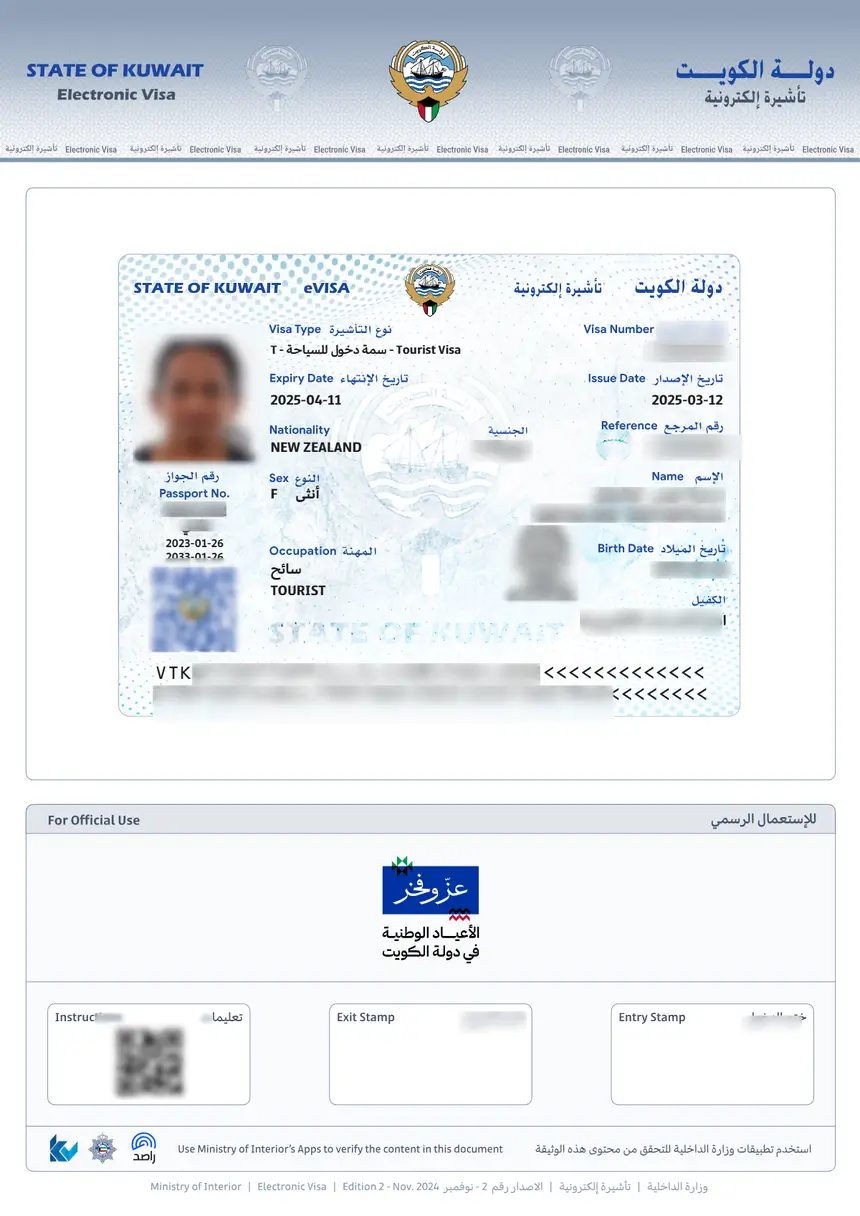
When approved, log in to the portal and download your eVisa as a PDF. Print at least two copies and keep a digital copy on your phone.
Common Form Errors and How to Avoid Them
| Error | Why It Happens | How to Fix |
|---|---|---|
| Name mismatch | Using a nickname or omitting middle names | Enter name exactly as on passport |
| Photo rejected | Wrong background, glasses, or poor quality | Use white background, no glasses, high resolution |
| Passport number wrong | Typo or missing characters | Copy directly from passport, double-check |
| Passport expiring soon | Less than 6 months validity | Renew passport before applying |
| Payment declined | Bank blocks international transaction | Contact bank to authorize KWD 3 charge |
| File too large | Upload exceeds 2 MB | Compress images before uploading |
| Wrong nationality | Dual citizen selected wrong passport | Use the passport you will actually travel with |
FAQs About Kuwait eVisa Application Form
Is the Kuwait eVisa application form available as a PDF?
No. The Kuwait eVisa application form is only available online through the official portal at kuwaitvisa.moi.gov.kw. There is no downloadable PDF form. The entire process, including document upload and payment, happens on the website.
How much does a Kuwait eVisa cost?
The Kuwait eVisa fee is KWD 3, which is approximately USD 10. This is a non-refundable government fee paid during the online application process via KNET, Visa, or Mastercard.
What documents are needed for a Kuwait eVisa?
You need a valid passport with at least 6 months of remaining validity, a passport-sized photo with white background, proof of accommodation in Kuwait, and a return or onward flight booking. All documents must be uploaded in JPG, PNG, or PDF format under 2 MB.
Can I save the Kuwait eVisa form and complete it later?
The MOI portal allows you to save a draft of your application and return to it later. However, you must complete all sections and pay within 30 days, or the draft expires and you need to start over.
How do I download my Kuwait eVisa after approval?
Log in to kuwaitvisa.moi.gov.kw, go to “My Applications,” find your approved application, and click the download button to get the eVisa as a PDF file. Print at least two copies for your trip.
Can someone else fill out the Kuwait eVisa form on my behalf?
Yes. A family member, travel agent, or employer can complete the form on your behalf using your passport details and documents. However, the email used for the account should be accessible to the applicant for receiving notifications and the eVisa PDF.
What photo specifications does the Kuwait eVisa form require?
The photo must be a recent color passport photograph with a white background. Your face should cover 70-80% of the frame, with no glasses or head coverings (except religious). The file must be JPG or PNG and under 2 MB.
Do I need to print the Kuwait eVisa application form?
You do not need to print the application form itself. However, once your eVisa is approved and downloaded as a PDF, you should print at least two copies to carry during your trip. Airlines and immigration officers will ask to see the printed eVisa.